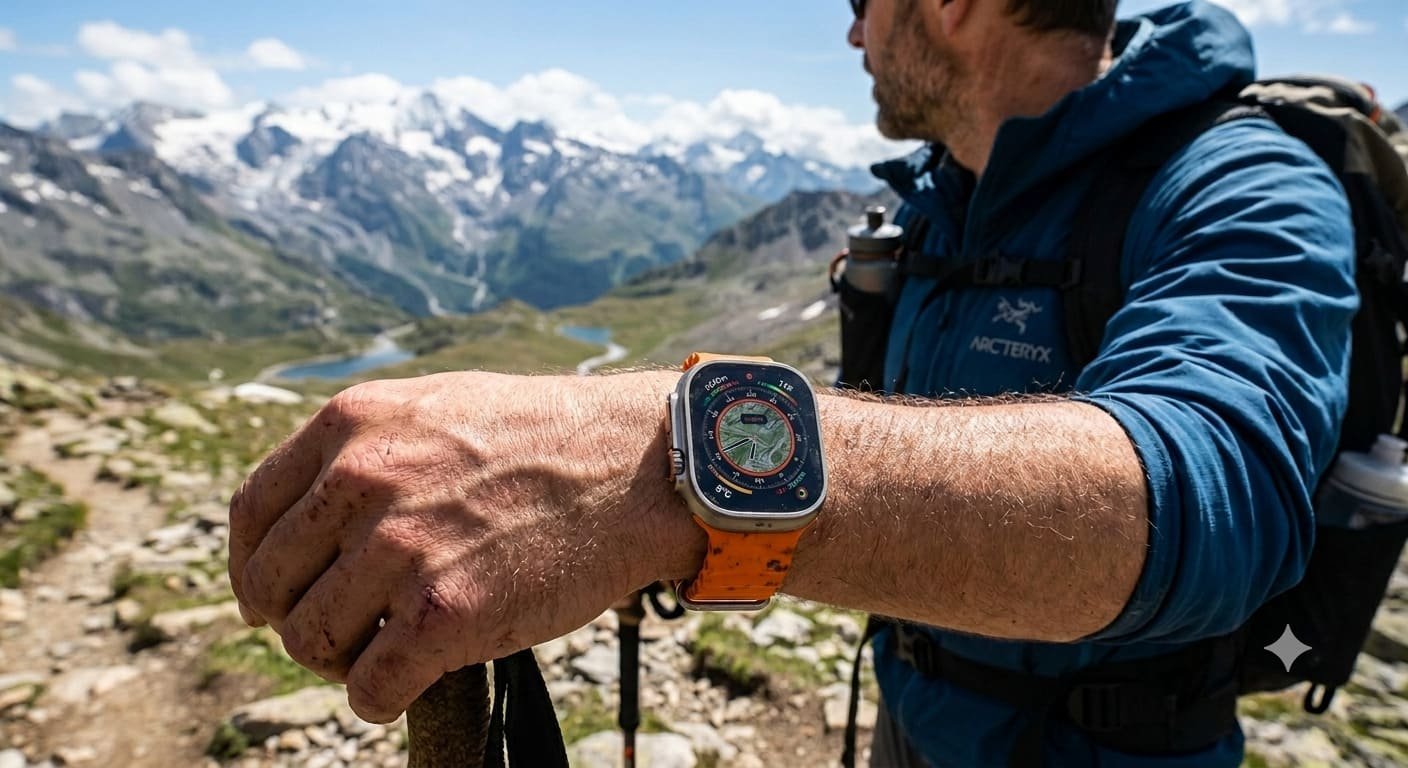
Smartwatches have become an important part of everyday life, helping people monitor their health, manage notifications, track workouts, and stay connected without constantly reaching for their smartphones. However, not every smartwatch is designed to handle demanding outdoor activities or the needs of people who spend long hours exercising. This is where the Apple Watch Ultra stands out.
Apple developed the Watch Ultra for users who want more than basic smartwatch functionality. Its rugged titanium construction, large display, advanced GPS capabilities, specialised workout features, and extended battery life make it an interesting option for runners, hikers, cyclists, swimmers, and adventure enthusiasts.
Unlike a traditional fitness tracker, the Apple Watch Ultra combines fitness monitoring with communication, navigation, and everyday convenience. Users can check their activity levels, receive messages, explore routes, and access supported applications from their wrist.
However, premium features do not automatically make a smartwatch the right choice for everyone. Its size, price, compatibility requirements, and charging needs are important factors to consider before buying.
In this detailed review, we explore the Apple Watch Ultra’s design, display, performance, health features, battery life, outdoor capabilities, advantages, limitations, and overall value to help you decide whether it deserves a place on your wrist.
1. Design and Build Quality: A Watch Built for Demanding Conditions
The first thing you notice about the Apple Watch Ultra is its distinctive appearance. Compared with conventional smartwatches, it has a larger case, a more substantial profile, and a design that looks ready for outdoor use.
The titanium case provides a balance between strength and weight, while the sapphire crystal display is designed to resist scratches from everyday use. Raised edges around the display offer additional protection against accidental contact with surrounding surfaces.
This construction makes the watch suitable for people who regularly participate in outdoor activities. Whether you are walking along a mountain trail, cycling through the countryside, or completing an intensive training session, the Ultra has a design that feels appropriate for an active lifestyle.
Another practical detail is the physical controls. The Digital Crown and side button provide familiar ways to navigate menus, select options, and manage functions. The larger Action button adds another shortcut, allowing users to access supported functions more quickly.
However, the rugged design also has a trade-off. Its larger case may feel uncomfortable for people with smaller wrists or those who prefer lightweight accessories. Some users may also find it less convenient to wear while sleeping.
Overall, the design is one of the Ultra’s defining strengths, particularly for people who value durability and a bold appearance over a compact, understated smartwatch.
2. Display Quality: Easy-to-Read Information Outdoors
A smartwatch display needs to do more than look attractive. It should make information easy to read while walking, running, cycling, or exercising in bright sunlight.
The Apple Watch Ultra features a large, always-on Retina display that allows users to view the time and supported information without repeatedly waking the screen. Its generous display area also makes workout statistics, notifications, maps, and controls easier to understand at a glance.
For runners, this can be particularly useful. Instead of navigating through multiple screens during a workout, you can quickly check details such as distance, pace, elapsed time, and heart rate when supported by the selected workout view.
The screen also makes everyday interactions more convenient. Reading incoming notifications, checking calendar reminders, and selecting applications can feel easier because more information fits on the display.
Brightness is another important advantage for outdoor use. A readable screen helps when moving between shaded paths and sunny environments, although visibility can still depend on glare, viewing angles, and the surrounding conditions.
The display’s size is not necessarily ideal for everyone, however. People who prefer smaller watches may find the overall design oversized.
For users who regularly exercise outdoors or want a smartwatch with a spacious display, the Apple Watch Ultra offers a practical balance of readability and functionality.
3. Performance and Everyday Smartwatch Features
A premium smartwatch should remain useful when you are not exercising. The Apple Watch Ultra is designed to handle everyday tasks alongside its specialised outdoor features.
When paired with a compatible iPhone, it allows users to receive notifications, read messages, manage reminders, check calendar events, and access supported applications. Depending on the app and connectivity available, users can also handle certain communication tasks directly from their wrist.
This can be convenient when your phone is in a bag, stored in a locker, or temporarily out of reach. Instead of checking your phone every few minutes, you can quickly determine whether a notification requires attention.
The watch also supports Siri for compatible voice commands. You may be able to perform tasks such as setting a timer, checking information, or managing supported functions without navigating through several menus.
The physical Action button provides another everyday benefit. It can be configured for supported shortcuts, including starting a workout or accessing selected functions. For active users, a physical button can be easier to operate than a touchscreen alone.
Cellular versions offer additional flexibility where supported. With an appropriate mobile plan and compatible network, certain communication and online functions can work without the iPhone being nearby.
Nevertheless, cellular connectivity is not a replacement for a phone in every situation. Some functions still require an iPhone, an internet connection, compatible services, or specific applications.
The overall experience is most appealing to iPhone users who want their smartwatch to combine communication, organisation, fitness tracking, and convenience in one device.
4. Fitness Tracking: More Than Counting Steps
Fitness tracking is one of the strongest reasons to consider the Apple Watch Ultra. While a basic activity tracker may focus primarily on steps and calories, the Ultra offers a broader selection of workout tools and performance measurements.
Users can track supported activities such as walking, running, cycling, swimming, and strength training. The watch records workout information that can help users understand their activity patterns and evaluate their progress over time.
For example, a runner can use workout data to compare distances, monitor pace, and review training sessions. Someone who cycles regularly may find GPS-based route and distance information useful when evaluating different rides.
The watch can also help people establish more consistent exercise habits. Activity summaries and progress indicators provide reminders of how much movement they have completed during the day.
However, fitness data is most useful when viewed over time rather than judged from a single workout. Changes in performance may reflect sleep, weather, training intensity, stress, or other everyday factors.
People who are new to exercise may appreciate the watch’s ability to make activity more visible. Instead of relying entirely on memory, they can use recorded sessions to see how their routines change from week to week.
Experienced athletes may benefit from the additional workout information, although professional training decisions should not rely on smartwatch measurements alone.
The Apple Watch Ultra is therefore useful for both casual exercise and more structured fitness routines, provided users choose features that match their goals.
5. Health Monitoring and Wellness Features
Beyond exercise tracking, the Apple Watch Ultra offers health-related tools designed to help users understand aspects of their everyday well-being.
Depending on the generation, software version, country, and supported configuration, available features may include heart-rate monitoring, sleep tracking, ECG functionality, blood oxygen measurements on eligible models and in supported regions, and notifications for certain heart-rate patterns.
Heart-rate information can help users understand how their body responds to different activities. For instance, comparing readings during a walk and a more demanding workout may offer a general picture of exercise intensity.
Sleep tracking can also help users examine their sleeping habits. Reviewing sleep patterns over time may encourage more consistent routines, although wearable estimates are not a substitute for a clinical sleep assessment.
Some supported health functions are designed to notify users when measurements meet specified criteria. These features can provide useful information, but they do not guarantee that every health issue will be detected.
It is important to understand the limitations of wrist-based sensors. Readings may be affected by movement, fit, skin contact, and other factors. The availability of individual features can also change with model generation and local regulations.
The Apple Watch Ultra should be viewed as a wellness companion rather than a replacement for medical equipment or professional advice. Anyone experiencing concerning symptoms should seek appropriate medical attention instead of relying on smartwatch readings.
6. GPS and Navigation: Useful for Exploring New Places
Navigation is particularly important for people who enjoy running, hiking, or cycling in unfamiliar locations. The Apple Watch Ultra includes GPS capabilities intended to support outdoor workouts and route tracking.
During a recorded activity, GPS information can help estimate distance, map routes, and provide location-related workout data. This makes it easier to review where you travelled and how far you went.
For hikers, compass tools, elevation information, and supported navigation features can provide additional context while exploring trails. The Action button can also be configured for compatible functions that are useful during outdoor activities.
These tools may be valuable when following a planned route or comparing different running and cycling paths. They can also help users keep a record of favourite outdoor locations.
However, GPS accuracy is not identical in every environment. Tall buildings, dense tree cover, terrain, and other obstructions can affect location readings.
Users should also prepare for outdoor trips rather than treating a smartwatch as their only safety resource. Download or plan routes where supported, carry appropriate supplies, and make sure you understand the area before beginning a demanding hike.
For outdoor enthusiasts, the Ultra’s navigation features add meaningful value beyond the everyday functions found in a conventional smartwatch.
7. Battery Life: Designed for Longer Days
Battery performance is one of the most important considerations when buying a smartwatch. A device may have excellent features, but frequent charging can become inconvenient for people who exercise regularly or spend long periods away from home.
The Apple Watch Ultra was designed to deliver longer battery life than many standard Apple Watch models. This makes it attractive for extended workouts, long outdoor days, and users who want more flexibility between charging sessions.
Battery performance varies according to the watch generation and how it is used. Frequent GPS tracking, cellular connectivity, music streaming, high screen brightness, and demanding applications can all increase power consumption.
For example, someone who mainly checks the time and reads notifications may experience different battery life from a user who records several hours of GPS activity every day.
Low Power Mode and other supported power-saving settings can help extend usage when needed, although reducing power consumption may limit or change certain functions.
It is also worth considering charging habits. Users who track sleep may need to plan short charging periods during the day rather than leaving the watch on its charger overnight.
The Ultra’s battery advantage is useful, but it does not eliminate the need to recharge. Buyers should compare the manufacturer’s estimates for their exact model and consider their own daily routine before deciding.
8. Water Resistance and Adventure Activities
The Apple Watch Ultra is designed for a range of supported water-related activities, making it appealing to swimmers and some diving enthusiasts.
Its water-resistance rating and supported features depend on the specific model. Ultra models are designed for recreational scuba diving to depths of up to 40 metres when used according to Apple’s conditions and guidance.
For swimming, the watch can record supported workout information and help users review their activity afterwards. This is useful for people who want to monitor exercise sessions without carrying a separate fitness tracker.
However, water resistance does not mean that a device is permanently waterproof. Seals can deteriorate, and physical damage may affect protection against water.
Users should follow the manufacturer’s recommendations for swimming, diving, cleaning, and maintenance. They should also avoid assuming that every water sport is supported simply because the watch is designed for water-related activities.
For anyone planning to use the watch for diving, following the relevant safety guidance and equipment requirements is essential. A smartwatch should not replace proper dive training, appropriate instruments, or established diving safety procedures.
These capabilities make the Apple Watch Ultra more versatile than many everyday smartwatches, particularly for users whose hobbies involve water and outdoor environments.
9. Audio, Calls, and Communication on the Move
A smartwatch becomes more useful when it helps users stay connected without interrupting what they are doing.
The Apple Watch Ultra includes a microphone and speaker for supported communication functions. Depending on connectivity and configuration, users can make or answer calls, interact with Siri, and listen to certain audio responses directly from the watch.
This can be helpful during a walk, while completing household tasks, or when a phone is not immediately accessible. Cellular models provide additional flexibility when the required network and plan are available.
The watch also supports music-related functions, including playback controls and compatible audio applications. Listening options depend on the app, connection, and whether content is available for offline use.
However, the small speaker is not intended to replace a dedicated music system or high-quality headphones. In noisy outdoor settings, users may also find that using the watch for calls is less convenient.
Communication features work best as an extension of the smartphone experience rather than a complete replacement for it.
For people who want quick access to essential communication while exercising or travelling, these features add everyday value to the Ultra’s rugged design.
10. Software, Apps, and the Apple Ecosystem
The Apple Watch Ultra runs watchOS, Apple’s smartwatch operating system. Its software experience brings together activity tracking, notifications, applications, watch faces, and supported health features.
The available features depend on the installed watchOS version and the specific Ultra generation. Users should check software compatibility before purchasing an older model, especially if long-term software support is an important consideration.
Integration with an iPhone is one of the watch’s major strengths. Information from supported applications can appear on the wrist, while health and workout data can be reviewed through Apple’s associated software.
The watch can also support third-party applications for activities such as fitness, navigation, productivity, and entertainment. The exact selection varies by app availability and software compatibility.
However, this close integration also creates a limitation: the Apple Watch Ultra is designed for Apple’s ecosystem rather than Android phones.
If you already use an iPhone and other Apple devices, the watch may fit naturally into your routine. If you use an Android smartphone, a smartwatch designed for Android compatibility will generally be a more practical choice.
11. Comfort and Daily Wear
A smartwatch may offer advanced features, but comfort determines whether people actually want to wear it throughout the day.
The Apple Watch Ultra’s larger case provides space for its display and rugged design. However, it may feel more noticeable than smaller watches, particularly when wearing long sleeves, typing at a desk, or sleeping.
The choice of band can also affect the experience. A suitable band should fit securely without being uncomfortably tight. People who exercise frequently may prefer a band designed for moisture management and comfortable movement.
Wrist size and personal preference matter here. Some users enjoy the substantial appearance, while others prefer a smaller, lighter device.
Before purchasing, it is worth trying the watch on in person if possible. Pay attention to how it feels during wrist movement, how easily you can reach the controls, and whether the case suits your everyday clothing.
Comfort is especially important for people who plan to wear the watch overnight for sleep tracking. A watch that feels cumbersome may reduce the likelihood of using that feature consistently.
The Ultra’s design works best for people who are comfortable with a larger smartwatch and want its additional outdoor-focused capabilities.
12. Apple Watch Ultra vs a Standard Apple Watch
Choosing between the Apple Watch Ultra and a standard Apple Watch largely depends on how you intend to use the device.
The Ultra prioritises a rugged construction, a larger display, outdoor features, and longer battery life than many standard models. These benefits can matter to users who frequently participate in demanding activities.
A standard Apple Watch may be more appealing to someone who mainly wants notifications, everyday fitness tracking, health-related features, and a more compact design.
Price is another consideration. The Ultra occupies a premium position in Apple’s smartwatch range, so its extra capabilities should justify the additional spending.
It is also important to compare specific generations rather than assuming every model has identical features. Display specifications, sensors, battery estimates, and supported software functions can differ.
If you exercise occasionally and mostly use a smartwatch for everyday tasks, a standard model may be sufficient. If you regularly hike, run long distances, swim, or rely on outdoor navigation, the Ultra’s additional features may be more useful.
The best choice is the one that fits your real needs rather than the model with the most impressive specification list.
13. Apple Watch Ultra: Main Advantages and Disadvantages
Advantages
- Rugged titanium construction and a sapphire crystal display.
- Large, bright, always-on display for everyday and outdoor use.
- Comprehensive workout tracking and GPS-based activity information.
- Useful navigation and compass features for outdoor enthusiasts.
- Battery life designed to exceed that of many standard Apple Watch models.
- Supported water-activity features, including recreational diving capabilities.
- Convenient integration with compatible iPhones and applications.
Disadvantages
- Larger case may not suit smaller wrists or users who prefer compact watches.
- Premium pricing may be difficult to justify for casual smartwatch users.
- Battery life still depends on usage and requires regular charging.
- Best suited to users within Apple’s ecosystem.
- Some health and connectivity features depend on model, region, and service availability.
Considering both sides provides a clearer picture of where the Apple Watch Ultra offers genuine value and where a simpler device may be sufficient.
14. Who Should Consider Buying the Apple Watch Ultra?
The Apple Watch Ultra is best suited to people who can make practical use of its specialised features.
Outdoor enthusiasts: Hikers, trail runners, cyclists, and people who regularly explore new places may benefit from its rugged construction and navigation tools.
Fitness-focused users: People who train consistently can use workout tracking and activity records to monitor their progress.
Swimmers and eligible diving enthusiasts: Supported water-related capabilities make it a useful option for certain activities when manufacturer guidance is followed.
iPhone users who want a premium smartwatch: Those who value a large display, durable design, and broad smartwatch functionality may find it appealing.
However, buyers who mainly want to count steps, check notifications, or monitor occasional workouts may not need its specialised features.
People who use Android phones should also consider compatibility before making a purchase. Choosing a watch that works naturally with your smartphone will generally provide a better experience.
15. What to Check Before Buying
Before purchasing an Apple Watch Ultra, consider a few practical points to make sure the device matches your expectations.
First, identify the exact generation you want to buy. Specifications, health functions, battery estimates, and software compatibility can vary between models.
Second, compare the current price with that of a standard Apple Watch. If you will rarely use the Ultra’s outdoor functions, the extra expense may not provide much additional value.
Third, consider whether you need cellular connectivity. A cellular model may offer more flexibility away from your phone, but availability and costs depend on the mobile carrier and plan.
Fourth, try the watch on if possible. Its larger case is an important part of the design, but comfort depends on wrist size and personal preference.
Finally, check warranty coverage, seller reliability, included accessories, and the availability of service in your region. These details are particularly important when purchasing an older or discounted model.
Taking a few minutes to compare these factors can help you make a more informed buying decision.
16. Is the Apple Watch Ultra Good Value for Money?
The value of the Apple Watch Ultra depends on how much use you will make of its additional capabilities.
For someone who runs long distances, explores unfamiliar trails, swims regularly, or uses advanced workout features, the watch may provide meaningful benefits beyond those of a basic smartwatch.
Its rugged construction, spacious display, outdoor functions, and extended battery estimates can make it a worthwhile investment for the right user.
However, premium pricing is harder to justify when most of the watch’s specialised features remain unused. A casual user may be equally satisfied with a less expensive smartwatch or standard Apple Watch.
Value also depends on the exact model and purchase price. Older generations may be available at different prices, but buyers should check battery condition, warranty coverage, compatibility, and remaining software support when shopping for used or discounted devices.
Rather than judging the Ultra only by its price, consider whether its features solve problems you actually encounter. The best purchase is one that improves your daily routine without paying for capabilities you do not need.
Final Verdict: Is the Apple Watch Ultra Worth It?
The Apple Watch Ultra is a powerful smartwatch designed for people who want more than basic notifications and step counting. Its durable construction, large display, workout tracking, GPS capabilities, and outdoor-focused features make it an appealing companion for an active lifestyle.
It also remains useful during everyday activities, offering convenient access to messages, applications, communication tools, and supported health information when paired with a compatible iPhone.
Its main limitations are its premium positioning, larger size, and dependence on regular charging. Some buyers may also find that a standard Apple Watch delivers everything they need at a lower cost.
Ultimately, the Apple Watch Ultra makes the most sense for active iPhone users who will regularly use its specialised fitness, navigation, and durability features. For casual smartwatch users, a standard Apple Watch may be the more practical choice.
Frequently Asked Questions
1. Is the Apple Watch Ultra worth buying?
The Apple Watch Ultra is worth considering for outdoor enthusiasts, athletes, and users who need advanced fitness tracking, durable construction, and navigation features. Casual users may prefer a standard Apple Watch.
2. How long does the Apple Watch Ultra battery last?
Battery life depends on the model and usage. The original Apple Watch Ultra was rated for up to 36 hours of normal use, while GPS tracking and cellular connectivity can affect actual battery performance.
3. Can the Apple Watch Ultra be used for swimming and diving?
Supported Apple Watch Ultra models are designed for swimming and recreational scuba diving to specified depths. Always follow Apple’s water-resistance guidance and the safety requirements for your activity.
4. Does the Apple Watch Ultra work with Android phones?
No. The Apple Watch Ultra requires a compatible iPhone for setup and is not designed to pair with Android smartphones.